
Best utilities apps for iphone
- Measure|
- Calculator₊|
- ChatGPT|
- Google|
- Pinterest|
- sqft AR|
- Flashlight Ⓞ|
- Apple Books|
- Unit Converter - Best Unit App|
- GCI Business|
Here are UPUP's list of best utilities apps for iphone:
- 1 Ranking
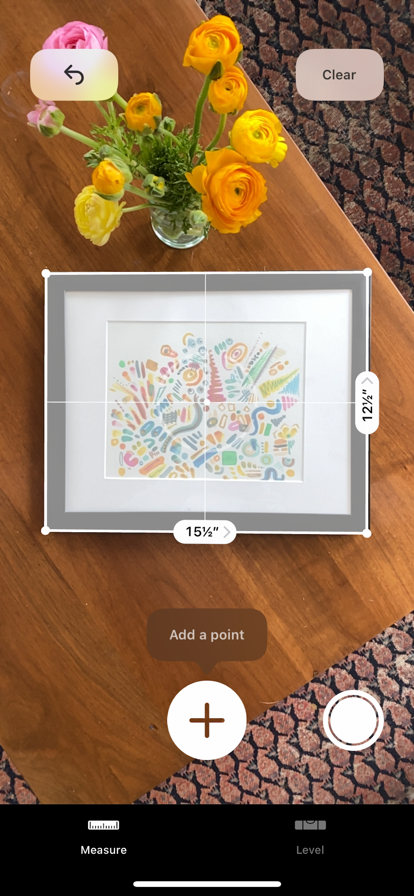
Turn your iPhone or iPad into a tape measure with Measure. Measure enables you to quickly gauge the size of real objects, a person’s height, and it can automatically provide the dimensions of rectangular objects. Features • Draw lines and estimate their length in both horizontal and vertical dimensions. • Automatically measure rectangular objects. • Share measurements with friends via Mail, Messages, and more. On the iPhone 12 Pro and iPhone 12 Pro Max (and later), iPad Pro 11-inch (2nd generation and later), iPad Pro 12.9-inch (4th generation and later): • Horizontal and vertical guide lines appear when measuring large objects for easier and more accurate measurements. • Instantly measure a person’s height from the floor to the top of their head, hair, or hat. • Save measurements from a single session, complete with screenshots, so they’re easy to access and share whenever you need them.
- Price
- Free
- Size
- 0.57M
- Type
- utilities apps
- Rating 3.2 (1307 Ratings)

- 2 Ranking
America's #1 Calculator App! Download Calculator₊ Now - Your All-in-One Math Solution! We're excited to announce the biggest update to Calculator₊ in 10 years! With over 200 million downloads and a whopping 3 million+ 5-star ratings, Calculator₊ is the trusted choice of millions worldwide. And now, it's even better! More Than Just Your Average Calculator! • Standard Calculator: Breeze through basic arithmetic operations like addition, subtraction, multiplication, and division. • Scientific Calculator: Tackle complex calculations with ease, including trigonometric, logarithmic, and exponential functions. • Calculation History: Keep track of your past calculations with a detailed history log. • Unit Converter: Effortlessly convert units like inches to centimeters and much more, making it a handy tool for everyday use. • Percentage Calculator: Easily calculate increases, decreases, and percentage changes with pre-designed input fields that do the work for you. • Currency Converter: Convert currencies in real-time, including Bitcoin, with the latest exchange rates. • Fraction Calculator: Work seamlessly with fractions – perfect for students and professionals alike. • Ad-Free Experience: Say goodbye to annoying full-screen ads and focus on your calculations. Be Amazed by Our New AI-Powered Math Solver! • AI Math Solutions: Instantly solve math equations, quizzes, and word problems with our advanced AI. Use the Photo Solver to snap a picture of any problem, and Calculator₊ will work its magic. • Math Notes: A dedicated note-taking tool for all your math needs. Jot down equations, diagrams, and notes in a space designed for mathematical thinking. • Instant Math: In Math Notes mode, simply write an equation, add an "=", and Calculator₊ will generate the solution in real-time. Why Choose Calculator₊? • Proven Track Record: Over a decade of providing fast and reliable calculations. • Loved by Millions: Join the 200+ million users who rely on Calculator₊, with an average rating of 4.7 stars from 3.5 million reviews. • Versatile & Powerful: Handles everything from basic sums to advanced scientific calculations. Perfect for school, work, or home. Celebrate with a Special Gift! To celebrate the release of this massive update, we're offering a 1-MONTH FREE TRIAL of our premium features, including: • Ad-Free Experience: No more pesky ads. • Unlimited AI Math Solving: Solve as many equations and problems as you need. • Unlimited Fraction Calculations: Ideal for students and professionals alike. • Unlimited Currency Conversions: Including real-time Bitcoin conversions. • Premium Customer Support: Get priority assistance from our expert support team. If you have any suggestions or questions, our support team is ready to help. Simply email us at [email protected]. Terms & Conditions: https://impalastudios.com/terms Privacy Policy: https://impalastudios.com/privacy
- Price
- Free
- Size
- 270.42M
- Type
- utilities apps
- Rating 4.7 (1633027 Ratings)
- Tools
- Efficiency


- 3 Ranking
Introducing ChatGPT for iOS: OpenAI’s latest advancements at your fingertips. This official app is free, syncs your history across devices, and brings you the newest model improvements from OpenAI. With ChatGPT in your pocket, you’ll find: · Advanced Voice Mode–tap the soundwave icon to have a real-time convo on the go, request a bedtime story for your family, or settle a dinner table debate. · Creative inspiration—birthday gift ideas or help creating a personalized greeting card. · Tailored advice—help crafting a personalized response or talking through a tough situation. · Learning opportunities—help explaining electricity to a dinosaur loving kid or the ability to easily refamiliarize yourself with a historic event. · Professional input—a brainstorm partner for marketing copy or a business plan. · Instant answers—clarification whether the napkin goes on the right or the left of the plate or a recipe when you only have a few ingredients. Join hundreds of millions of users and try the app captivating the world. Download ChatGPT today. Terms of service & privacy policy: https://openai.com/policies/terms-of-use https://openai.com/policies/privacy-policy
- Price
- Free
- Size
- 73.47M
- Type
- utilities apps
- Rating 4.9 (1463038 Ratings)
- Efficiency
- Tools


- 4 Ranking
Download the Google app to stay in the know about things that matter to you. Try AI Overviews, find quick answers, explore your interests, and stay up to date with Discover. The more you use the Google app, the more it’s tailored to you. Feature highlights: • Image Search: See something you like? Snap a photo and discover where to shop for it, find related images, and more. Refine your camera searches by adding words – whether you want those shoes but in ‘blue’, or want to learn how to ‘repair’ that broken bit on your bicycle. • Hum to Search: Can't remember the name of that song? Hum the tune and the Google app will identify it for you. • Discover: Stay up-to-date on topics that matter to you. Get personalized news, articles, and videos based on your interests and search history. • Try AI Overviews: We’re making search smarter and simpler with generative AI. Try searching things like ‘how to cut onions without crying’ or ‘how to fix a broken zipper’ and AI Overviews will find what you’re looking for in faster, easier ways. • Google Search Widget: Search from your home screen or lock screen with the new Google widget. Choose from 2 widgets, giving you a quick search bar in both sizes, and shortcuts to choose how you Search with Lens, Voice, and Incognito in the medium size widget. Search what you see with Google Lens: • Use your camera to identify what you’re looking at. Identify plants and animals, translate text in real-time, find similar products to buy, and even solve math problems with step-by-step guides. • Translate over 100 languages on things like road signs when you travel, menus, and more by pointing your camera at text. • Reverse image search: Find the source, similar photos, and related information for any image. • Socratic app functionalities like step-by-step homework help on math, physics and word problems, and testing your knowledge with Questions and Answers are now fully supported within the Google app. Get personalized updates in Discover: • Stay in the know about topics that interest you. • Start your morning with weather and top news. • Get real-time updates on sports, movies, and events. • Know as soon as your favorite artists drop new albums. • Get stories about your interests and hobbies. • Follow interesting topics, right from Search results. Search safely and securely: • All searches in the Google app are protected by encrypting the connection between your device and Google. • Privacy controls are easy to find and use. Tap your profile picture to access your menu and delete recent search history from your account with one click. • Search proactively filters webspam to help ensure that you see safe, high-quality results. Learn more about what the Google app can do for you: https://search.google/ Privacy policy: https://www.google.com/policies/privacy Your feedback helps us create products you'll love. Join a user research study here: https://goo.gl/kKQn99
- Price
- Free
- Size
- 325.69M
- Type
- utilities apps
- Rating 4.6 (2423575 Ratings)


- 5 Ranking
Pinterest is a place of endless possibilities. You can: - Explore new ideas - Shop new trends - Try new things Unlock billions of ideas and turn your dreams into reality. On Pinterest, nothing is impossible: Seeing yourself in your dream wardrobe? Finding new recipes for weeknight dinner? Shopping the perfect pieces for your home? Creating a life you love? It's Possible.
- Price
- Free
- Size
- 229.43M
- Type
- utilities apps
- Rating 4.8 (5150552 Ratings)
- Life
- Photo & Video


- 6 Ranking
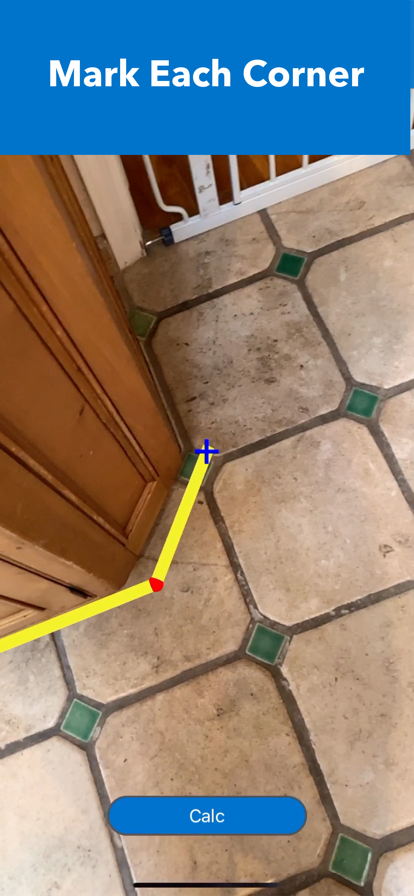
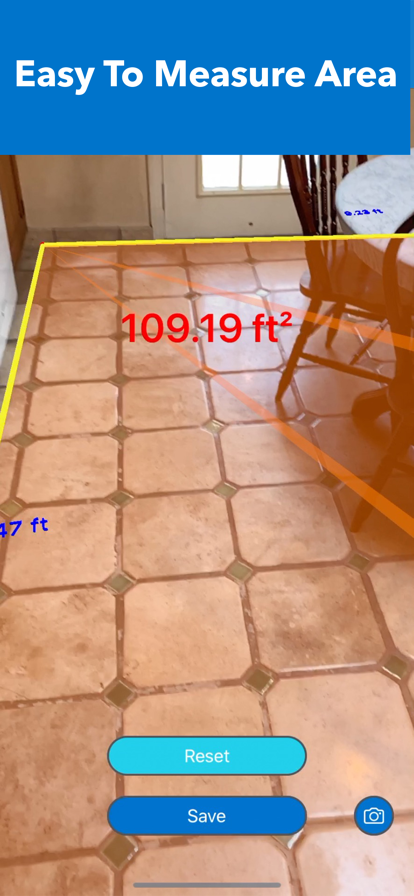
The app has five core features. 1. Area - Floor : To measure the horizontal area on a floor in ft² or m² 2. Area - Wall: To measure the vertical area on a wall in ft² or m² 3. Length : To measure the length between two points 4. Furniture : To measure the relative size of the space by placing standard sized virtual furnitures 5. Size Checker: To check the relative size of product in real world by comparing to other objects. To check whether the size of product fits the space or not HOW TO USE 1. Area - Floor or Wall - Choose unit between ft² or m² - Tap "Area - Floor" or "Area - Wall" on the main menu - Move camera to scan surrounding area - Find a flat surface on the floor or on the wall until blue square appears - Place the pointer ("+" on the center of the screen) to one of the corners on the floor or on the wall - Tap the screen to mark by red sphere - Move slowly clockwise ( or counterclockwise) to next corner and repeat the action until all corners are marked by red sphere ( Do not mark twice on the starting point) - Tap "Calc" button to calculate the area - To save data, tap "Save" button and type remarks and tap "Save" - To take a photo, tap "Camera" button - To find saved data of Area, tap "File" mark on the top right cornier on the main menu - To see the location and photo (if it was taken) of saved data, tap the row on the list of saved data - To delete saved data, tap "File" mark on the main menu and slide the finger from right to left on the row on the list of saved data - In some cases, AR shaded orange area may be displayed outside of the outlines or be overlapped, this does not affect the calculation of the area 2. Length - Tap "Length" on the main menu - Move camera to scan surrounding area - Wait until a lot of yellow dots display on the surface of the target object. - Place the pointer ( "+" on the center of the screen) to the starting point of measuring object - Tap the screen to mark by red sphere - Move slowly to the other end of measuring object and place the pointer - Tap the screen to display the length - To measure another object, tap "Reset" button and repeat same procedure - To take a photo, tap "Camera" button 3. Furniture - The virtual furnitures are standard or typical size to help measure relative size of the space - Tap "Furniture" on the main menu - Move camera to scan surrounding area - Find a flat surface on the floor until blue square appears - Choose one of furnitures on the list of furnitures and tap it - Tap the screen where to place the furniture - To rotate the furniture, touch the screen on the furniture and slide the finger - To move the furniture, long press the screen on the furniture and slide the finger - To place more furniture, tap "Add Another Item" button and repeat the procedure - To hide the size of furnitures, tap "Info" button - To display the size of furnitures, tap "Info" button again - To take a photo, tap "Camera" button 4. Size Checker - This feature is to check the relative size of product in real world by comparing to other objects - To check whether the size of product fits the space or not - Select measure unit - Type Width, Depth and Height into each field - Select surface to place AR box and tap GO - Move camera to scan surrounding area - Find flat surface to place AR box until blue square appears - Tap screen where you want to place AR box
- Price
- Free
- Size
- 14.59M
- Type
- utilities apps
- Rating 4.4 (648 Ratings)
- Tools
- Efficiency

- 7 Ranking
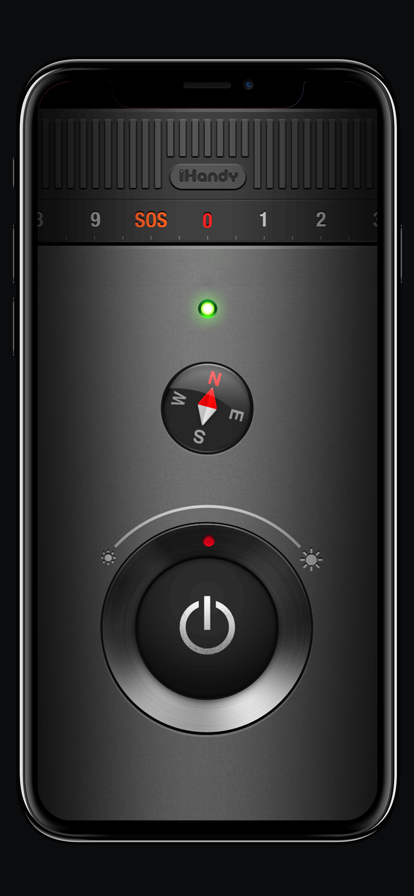
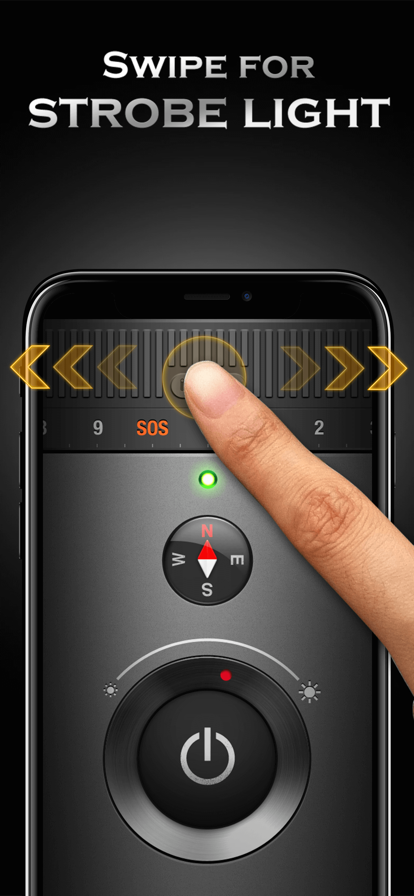
Bright. Fast. Simple. The most elegant and functional flashlight app, ever! And it even goes with a compass, giving you the direction in the darkness. Don't miss it! New feature: • Built-in Mini Map, by tapping on the compass • LED brightness control • Full support for iPhone 6, iPhone 6s, iPhone 6 plus, iPhone 6s Plus, iPhone 7, iPhone 7 Plus, iPhone 8, iPhone 8 Plus, and iPhone X. Features: • Brightest Flashlight instantly ON • Always-On compass • Strobe mode with 10 different frequencies • Built-in SOS signal • Intuitive and elegant UI design Continued use of the flash may dramatically decrease battery life.
- Price
- Free
- Size
- 59.02M
- Type
- utilities apps
- Rating 4.5 (30168 Ratings)

- 8 Ranking
Apple Books is the best place to discover, read and listen to entertaining and informative books and audiobooks. Browse through top charts, personalised recommendations and expertly curated collections in the Book Store and Audiobook Store, or use search to easily find the perfect read or listen, no subscription needed. Track what you’ve read and want to read, and set your own reading goals—all in one app and across all your Apple devices. Explore millions of books and audiobooks • Check out today’s bestsellers, free books and special offers for readers of all ages, plus personalised recommendations. • Explore collections curated by the Apple Books team to find your next book or audiobook in your favourite genres, from mysteries and thrillers to romance, history, self-development and kids. • Sample any book or preview an audiobook to start enjoying the first few pages for free. • Keep track of the books and audiobooks you’re interested in with your Want to Read list. Customise your reading experience • Choose from a selection of reading themes, which include a variety of fonts and background colours. • Make your book easy to read by adjusting line height and letter spacing to your preference. • Use Auto-Night Theme and adjust your screen brightness to make reading more comfortable for your eyes. • Enable vertical scrolling to move continuously through books instead of flipping pages. Make reading a habit with Reading Goals • Set a reading goal to encourage yourself to read daily. • Track reading streaks and how many books you’ve read this year. • Get reminders and coaching to help you achieve your reading goals. Share with your whole family • Family Sharing lets you enjoy your books and audiobooks with your favourite people. Invite up to five family members. Apple CarPlay • Designed with safety in mind, the Audiobooks app in Apple CarPlay allows you to listen to audiobooks while driving. • Large buttons make it easy to start and stop, rewind or fast forward, and the simplified library helps you find your next audiobook while still keeping your eyes on the road. Apple Watch features • Use the Audiobooks app on Apple Watch to get back to your recent audiobooks or browse your library right from your wrist. • Use the Watch app on iPhone to choose which audiobooks to download to your Apple Watch. Requirements & store availability • iPhone requires iOS 11 or later. • iPad requires iPadOS 11 or later. • Content varies by country or region and may not be available on all devices.
- Price
- Free
- Size
- 9.80M
- Type
- utilities apps
- Rating 4.2 (39543 Ratings)


- 9 Ranking
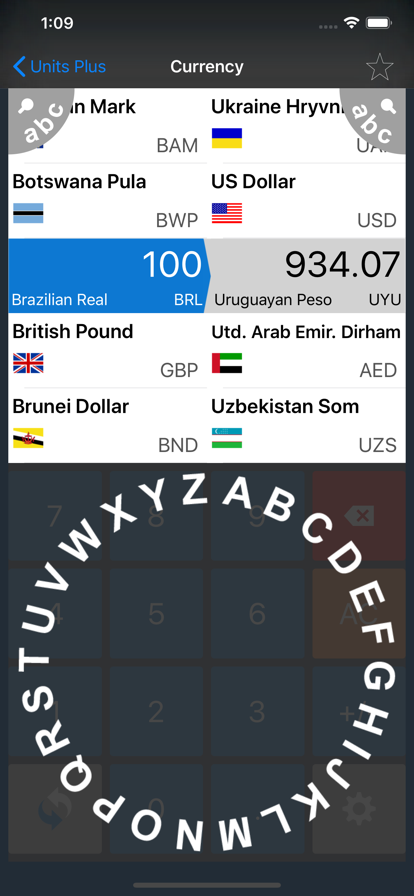
This is FREE version of Units Plus Converter SWAP units by pressing button on keypad (lower left) OPTIMIZED for iPhone 11, 11 Pro, 11 Pro Max, X, XS, XS Max, XR, 5, 5S, SE, 6, 6+, 7, 7+, 8, 8+ OPTIMIZED for iPad Pro 12.9 (1st, 2nd, 3rd gen), 11, 10.5, 9.7, Air, Air 2, Air 3, Mini (2nd, 3rd, 4th, 5th) OPTIMIZED for IPhone and iPad Retina display ***Now with LIVE Currency Updates for all major currencies in the world*** Very simple and beautifully designed unit converter with 12 categories and many different units: CONVERT: *Area *Currency (155 world currencies updated every day.) *Data-computer data (byte, kilobyte, megabyte, etc.) *Fuel-milage *Length *Power *Pressure *Speed *Temperature *Time (days, weeks, hours, etc.) *Volume (dry and wet) *Weight-mass Currency exchange rates are downloaded once a day when app is opened. Every download uses very small amount of data. Around 1-2kb. Internet connection required. 155 currencies available - This is all world currencies with their respective country flags.
- Price
- Free
- Size
- 16.18M
- Type
- utilities apps
- Rating 4.8 (148247 Ratings)
- Efficiency
- Tools


- 10 Ranking
This app is designed for business owners and stores, helping them easily manage income, bookings, and receive order notifications Notes: This app use only for Fastboy Marketing's Clients.
- Price
- Free
- Size
- 70.00M
- Type
- utilities apps
- Rating 2.1 (26 Ratings)